
Product Schema vs Collection Schema for Shopify Stores
TL;DR: This article explains Product Schema with practical examples for Shopify merchants, SEO teams, and agencies. For implementation context, see How SchemaForgeAI works, then validate outputs using Rich Results Test.
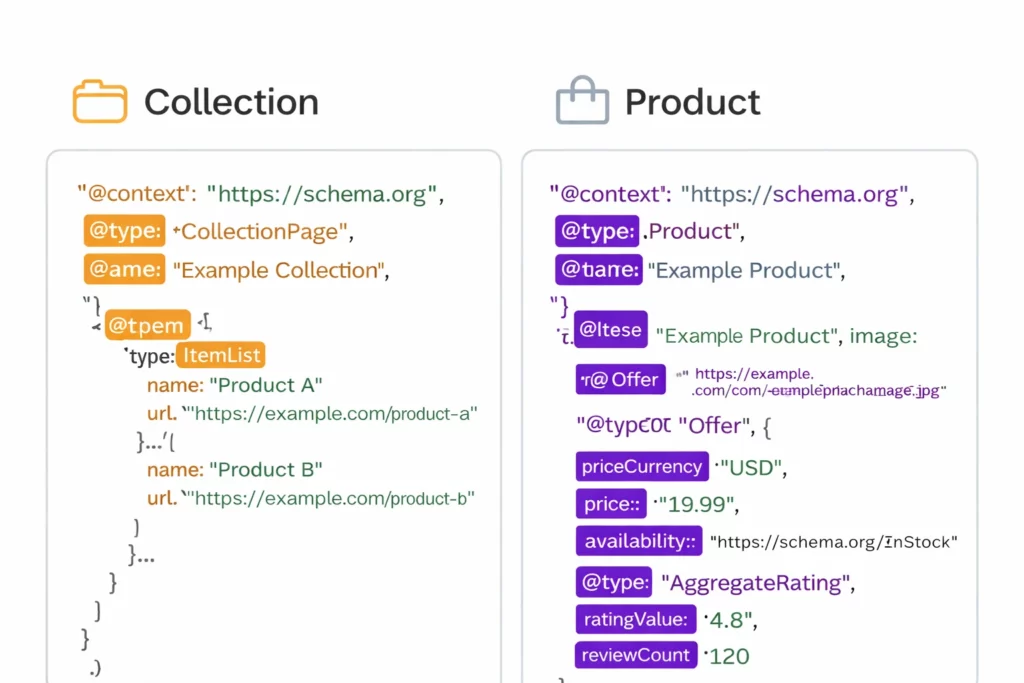
What Product schema describes
Product schema is designed for individual product detail pages. It describes what the product is, who the brand is, and what offers are available. In practical terms, it helps search engines interpret price, availability, and product identity.
On Shopify, Product schema is often provided by the theme. When it is correct and complete, it can support product rich results in search. However, default implementations can miss important context, and they can become inconsistent when multiple apps output markup.
For catalog heavy stores, consistency matters. If product offers, availability, and identifiers differ across pages, it can reduce structured clarity.
If you sell variants, make sure the structured data reflects the correct offer details for the canonical product. Incorrect availability or mismatched prices can cause warnings and can reduce trust in the markup.
Reference the vocabulary at Schema.org Product and review Google guidance for product rich results.
SchemaForgeAI helps teams generate consistent Product markup and apply enhancements where needed, without creating theme conflicts.
When you manage large catalogs, template based consistency is more valuable than one off manual edits. It keeps signals aligned across thousands of URLs.
If you have product identifiers such as GTIN or MPN, publishing them consistently can improve product matching. Accuracy matters more than completeness, so only publish identifiers you can verify.
What CollectionPage and ItemList schema adds
Collection pages represent groups of products. They are often where category intent lives, meaning the terms people search for when they are not looking for a specific product name. CollectionPage schema helps clarify that the page represents a collection, while ItemList can describe the set of products included.
Many Shopify stores rely on collection pages for SEO, but they publish limited structured data on those pages. Adding collection level structured data can strengthen how search engines interpret category intent and page relationships.
A good approach is to keep Product schema on product pages, then publish CollectionPage plus ItemList on collection pages. Avoid duplicating Product entities on collection pages. Instead, focus on describing the list and the page type.
If you have paginated collections, the key is consistency. Your collection schema should describe the page you are on, and your internal links should connect pagination clearly so crawlers can discover the full product set.
Learn more about Schema.org CollectionPage and Schema.org ItemList.
If you manage multiple collections and seasonal categories, a template based workflow is more scalable than manual edits. That is why SchemaForgeAI supports structured templates for collections.
Collection schema is also a helpful place to reinforce brand signals by referencing the same Organization identifier used site wide.
For stores with filters and sorting, keep canonical URLs stable. Structured data should describe the canonical page, not a temporary filtered state.
Helpful links
Internal pages: Pricing, How SchemaForgeAI works.
External references: Schema.org CollectionPage, Schema.org ItemList, Schema.org Product, Google product rich results.
Frequently Asked Questions
Do collection pages need schema
Collection pages benefit from schema because it clarifies category intent and how products are grouped, especially for large catalogs.
Should product schema appear on collection pages
In most cases, avoid duplicating Product entities on collection pages. Use CollectionPage and ItemList instead.
Why do collection pages rank without schema
They can rank based on content and links, but schema can improve clarity and support richer understanding of page type and relationships.
What is ItemList schema used for
ItemList describes a list of items on a page. For collections, it helps search engines interpret grouped products more clearly.